
Fansbuy go-ahead questions and the words on the settings screen
Short answers to what people ask about the permission and the rules around it, a glossary of the labels Fansbuy uses, and where to turn when a deduction looks wrong.
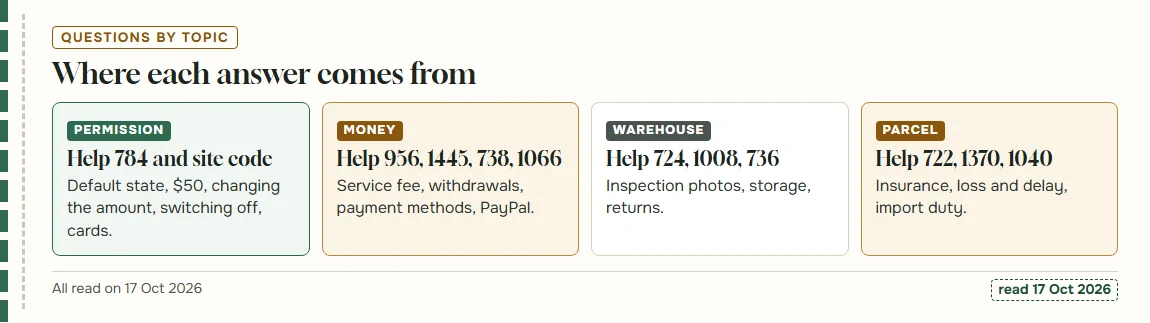
Short answers about the go-ahead and the rules around it
Each answer below is a sentence or two with a link to the Fansbuy page behind it. The permission questions come second, after the general ones people usually ask first.
Does Fansbuy charge a service fee?
The public service-fee article says purchasing is free, but public payment material and withdrawal guidance refer to an 8% service fee. Payment processing can add another charge. Confirm the actual breakdown on your account before paying; this guide has not verified an authenticated checkout.
How many inspection photos come as standard?
Public help differs: inspection rules mention three to ten standard photos, while another answer describes three free photos. Check your item’s actual included set and the price of extra photos or measurements before requesting them.
How long will Fansbuy keep my items?
Ninety days from the moment an order shows In warehouse, and up to 180 days with an extended-storage fee whose amount is not published (help 1008).
Can I return something I changed my mind about?
Request the return within seven days of warehouse receipt. The seller must accept it and the item must remain resalable with required proof and parts. The policy quotes 12 RMB postage for buyer-reason returns; confirm acceptance and the payment method with support.
Is parcel insurance included?
No. Fansbuy’s parcel cover is optional and paid, chosen when you submit the parcel, and it cannot be added after shipping (help 722).
What happens if a parcel is lost or very late?
Delay and loss follow different rules and can have different evidence, time limits, line exclusions and caps. Optional insurance changes the applicable terms. Keep the tracking and parcel records and ask support which rule applies; a period without updates alone does not confirm a payable claim.
Which payment methods can I use?
Use the methods actually offered for your account, destination and transaction. A method mentioned in public help may be handled manually or unavailable on the current payment screen. Read the payment fee, currency and refund route before confirming.
How do withdrawals work?
Check the current withdrawal screen and original funding transaction. Published guidance describes returning approved withdrawals through the original method, with deductions and different treatment of service versus payment fees. Confirm the recoverable amount and timing with support before assuming the full wallet balance will reach your bank.
Will I pay import duty?
It depends on the destination, goods and shipping arrangement. Being below a duty threshold does not necessarily remove VAT, carrier fees or other import charges. Check the current destination rules and whether the particular line prepays any taxes.
Is the permission switched on for a new account?
Without an account we could not see this. The agreement speaks of enabling the feature and of disabling it, so its wording does not settle it. Look at Custom Functions and at the tick when you pay.
Is $50 the most I can set?
The agreement’s condition is written as $50; the settings screen asks you to choose your own amount. How the two relate is not visible without an account. See the dollar condition section.
Can I change the amount while I am paying?
The checkout shows an Adjust limit link next to the tick, which leads to Custom Functions. Fansbuy’s pages do not say whether a new amount applies to orders already placed.
Does switching the permission off cancel anything?
No Fansbuy page says it does. By our reading of the site code it sets the authorised amount to zero; orders continue, and differences arrive as requests in your inbox and email.
Can the permission charge my card?
No. The agreement limits it to deductions from your Fansbuy account balance. With the balance short, Fansbuy says it will notify you to top up.
What is the difference between the two ticks?
The checkout tick covers seller price adjustments and local shipping fee changes; the parcel tick covers the international shipping difference. Each purchase has its own. The two ticks page has the detail.
Where do I see what was deducted?
In your Fansbuy balance records. For any deduction you do not recognise, the agreement points to online customer service; the next section has the contact routes.
Glossary of balance, parcel and settings terms
Fansbuy uses several names for the same thing and a few literal translations. This glossary gives each term in the form you will see it on the help pages, the checkout, the parcel page and the settings screen.
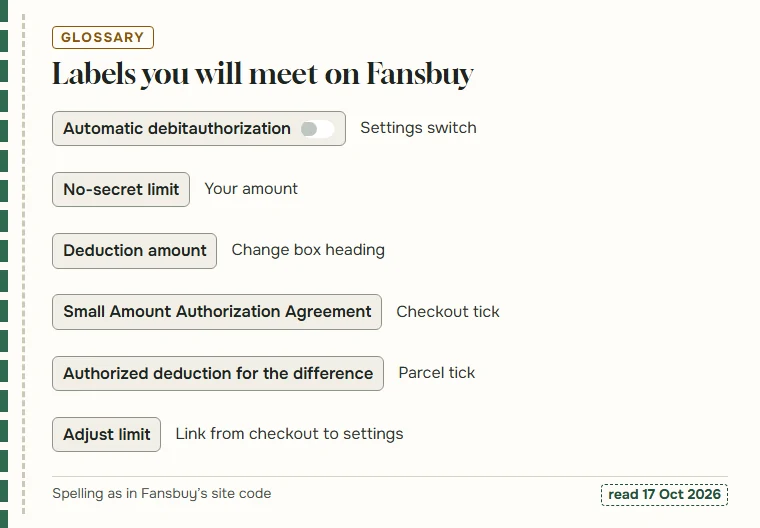
Two pairs cause most of the confusion. Balance Authorization and Automatic debit authorization are the same feature under the help page’s name and the settings screen’s name. Small Amount Authorization Agreement and Authorized deduction for the difference are the two ticks: the first at product checkout, the second at parcel submission.
The chart beside this text shows the labels as the site code spells them, including the missing space in the switch name. The full list follows below, in the order you are likely to meet each term.
- BalanceMoney held in your Fansbuy account; the only thing the permission can draw on.
- Balance AuthorizationThe name help 784 gives the feature in its first sentence.
- Small Amount Authorization AgreementHelp 784 itself, and the label on the checkout tick.
- Automatic debit authorizationThe settings switch, written without a space on screen and in the code.
- No-secret limitYour authorised amount, as the settings screen labels it; it reads like a literal rendering of a password-free limit.
- Parcel fee adjustment authorizationThe parcel side of the settings screen, with Fansbuy’s reason for shipping differences.
- Authorized deduction for the differenceThe tick on the parcel submission page.
- Shipping depositInternational shipping paid at parcel submission on an estimated weight.
- Rehearsal or Preview PackagePacking and weighing first, then choosing the line and paying the final cost.
- Volume weightA carrier charging a light, bulky box by its size.
- Local shipping feeThe shop’s charge to send the item to the Fansbuy warehouse.
- Problematic OrderAn order missing a size or colour, waiting for you to confirm.
- Buyer’s messageA note a Fansbuy buyer leaves on your order.
- QC photos, GL and RLInspection photos; GL (green light) and RL (red light) are shoppers’ shorthand for keeping or rejecting an item after seeing them.
When a deduction looks wrong
If you need help with a deduction you did not expect, start with what you can check yourself. Find the order or parcel, the date and the amount. Then look at whether the tick was set on that order or parcel and whether the amount fits under your No-secret limit.
If it still looks wrong, the agreement points to Fansbuy’s online customer service for transaction questions, and the Contact US page lists [email protected]. Fansbuy also runs an official Discord server, discord.gg/4VPxrzrB6Z, useful for general questions but not for anything involving your account details.
For account-specific help, use the support entry in your Fansbuy order or parcel. This independent site cannot access transaction records or arrange refunds.